Yume — Account Deletion
How to delete your account from within the app
You can delete your Yume account in three steps directly inside the app. No email request or support ticket is required.
-
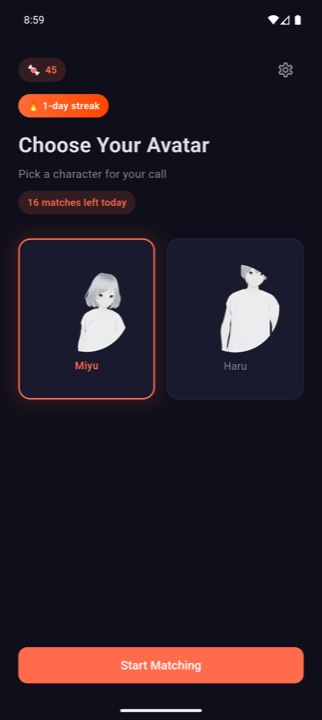
Open the app and tap the gear icon
Launch Yume and tap the gear (⚙️) icon in the top-right corner of the home screen to open Settings.
-
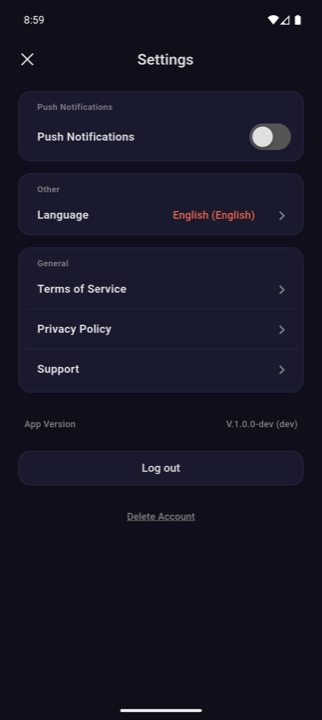
Scroll to the bottom and tap “Delete Account”
On the Settings screen, scroll all the way down. The “Delete Account” link is shown directly below the “Log out” button.
-
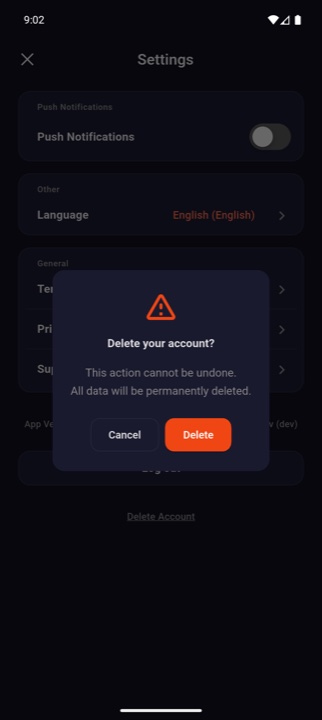
Confirm by tapping “Delete”
A confirmation dialog will appear. Tap the red “Delete” button to permanently remove your account. You will be signed out immediately. This action cannot be undone.
Request deletion by email
If you can no longer sign in, send an email titled “Account deletion request” to admin@connect-y.com from the email address associated with your Yume account. Verified requests are processed within 7 business days.
Data that will be deleted
The following items are removed immediately and cannot be recovered:
| Category | Details |
|---|---|
| Profile | Email, nickname, name, gender, date of birth, phone number, identity / adult verification timestamps |
| Authentication | Password and connections to Google, Apple, Kakao, Naver social logins |
| Devices & push tokens | All registered devices and push notification tokens (FCM / APNs) |
| Permissions | In-app permission grants such as camera, microphone, and notifications |
| Terms agreements | Records of accepted terms of service and privacy policy revisions |
| Candy balance | Your entire remaining Candy balance and any unused items purchased with Candy. Candy is non-refundable and non-transferable. |
| Match queue | Any active matching ticket is automatically cancelled |
| App-side data | Saved tokens, cached settings, and any locally stored preferences on your device |
Data retained for a limited period
To comply with applicable laws and to handle disputes, the following items are kept in a segregated store for the periods listed below, then permanently destroyed. During this retention window, only the minimum identifiers required are kept; the data is not accessible from the regular service.
| Item | Period |
|---|---|
| Deactivated account identifier | 30 days |
| Payment and refund records | 5 years |
| Consumer complaint and dispute records | 3 years |
| Service access logs | 3 months |